In many organizations across the US, including homeowner associations, cooperatives, partnerships, and corporations, voting power is often based on unit weight or percentage of ownership rather than giving each member or shareholder an equal vote. This approach ensures that voting influence aligns with each participant’s actual stake in the organization.
What is Unit Weight or Percentage of Ownership?
Unit weight represents the proportionate share each member, owner, or shareholder holds in the organization. It is usually expressed as a percentage of total ownership. For example, a shareholder who owns 10% of the company has a unit weight of 10%. All shares or units combined add up to 100%.
Why Use This Method?
Using unit weight for voting balances influence based on investment, contribution, or stake. It protects larger owners’ interests while still allowing smaller owners to participate. This method is common in corporations, real estate co-ops, LLCs, and other entities where ownership stakes vary.
How It Works in Voting
During a vote, each participant’s vote is multiplied by their ownership percentage. So if a member owns 15%, their vote counts as 15 votes toward the decision. For instance, if three members each holding 10%, 20%, and 30% vote “yes,” the total weighted vote is 60%.
Calculating Results
Instead of a simple headcount, votes are totaled using these weighted values. This ensures that decisions reflect the proportional interests of all owners or members. Fortunately, this is done seamlessly without extra effort in Ballot Bliss.
How to Add Unit Weights to Voters in Ballot Bliss
Unit weights are added to each voter’s profile during the initial contact import, which is handled by the Ballot Bliss team when setting up your account. However, if you need to update or add a unit weight later, follow these steps:
1. From your Ballot Bliss dashboard, go to Community and select Occupants.
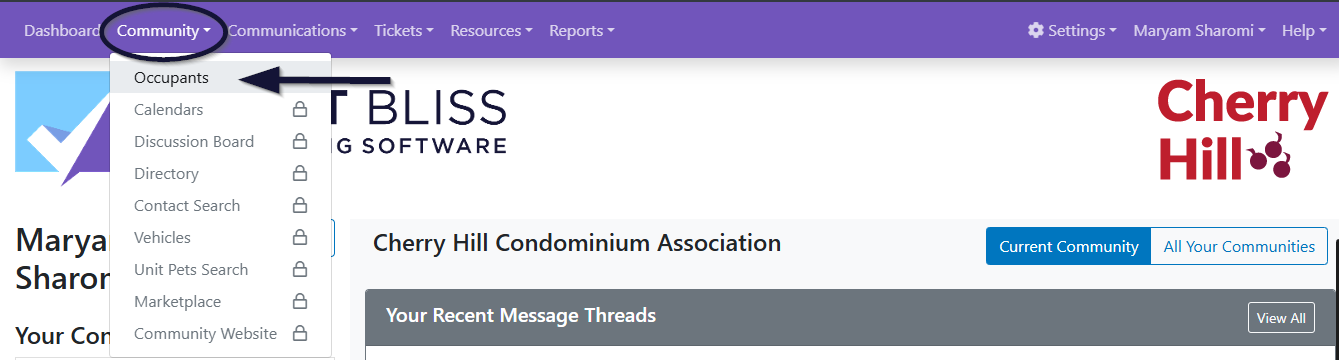
2. Use the search dropdown to find the voter or occupant. You can search by name or email address.
3. Once the name appears, click on it to open the voter’s profile.
4. On the profile page, click Unit & Account.
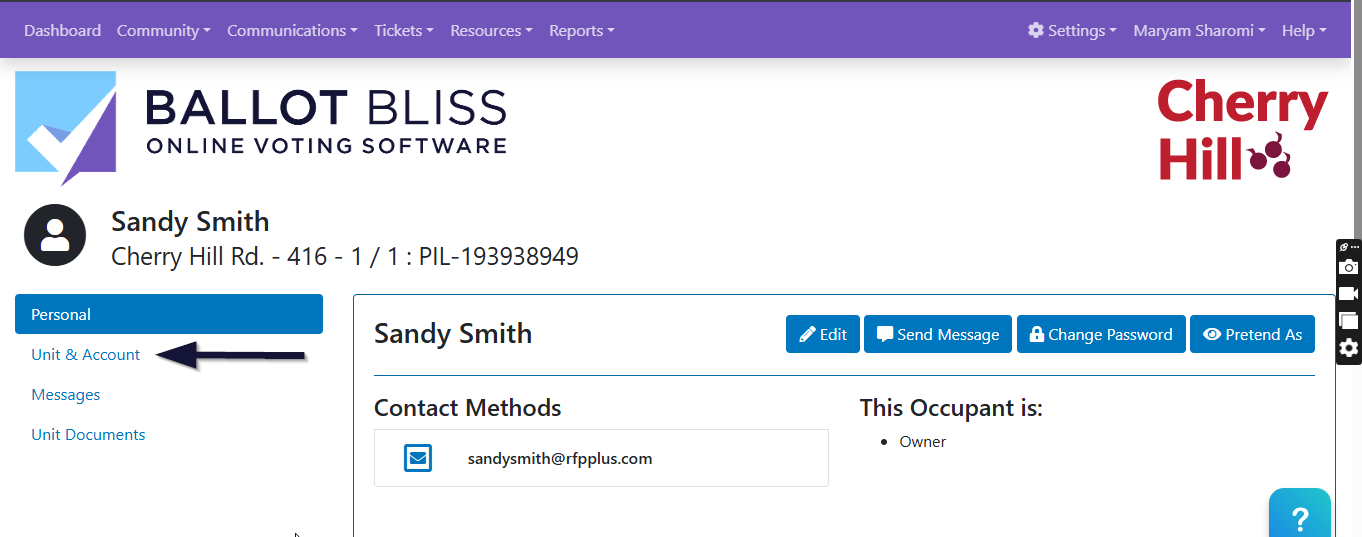
5. On the Unit & Account page, click on Edit.
6. Scroll down to the Percentage of Ownership field, enter the new unit weight, and click Update Unit to save your changes.
That’s it, the new unit weight is now saved for the voter or occupant.
How to use Unit Weight In your Ballot
Now that you know how to add or update a voter’s unit weight, here is how to enable this setting for a ballot:
On the Ballot Settings page, scroll down to the Vote Calculation section, and check the boxes labelled:
Show the results charts based on the percent of ownership (Votes will be weighted by their percent of ownership field in Pilera)
‘Use percent of ownership to show quorum status on the ballot listing page’.
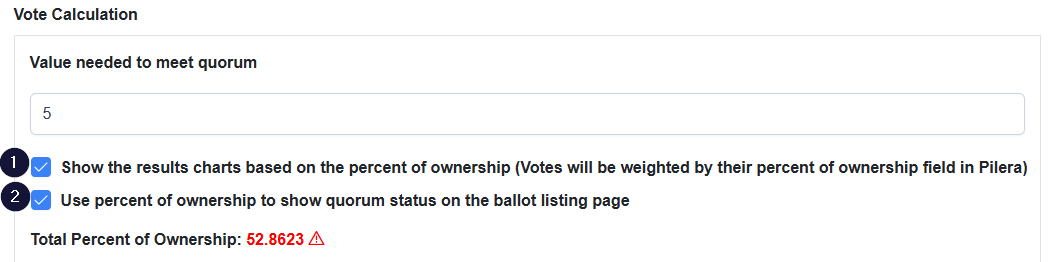
Once you check the first box, the system will alert you if there are any participants with missing unit weights. You can also export a list of all units with missing percentages of ownership so that you can fix it before activating the ballot. But, if you still want to proceed, scroll to the end of the pop-up and click Confirm.
Finally, scroll down and save the ballot settings.
By enabling this feature, your organization can ensure that each vote reflects the actual ownership structure, resulting in fairer and accurate election results.